

By Kazi Hasnain · Founder, ReformedTech.ca · Updated November 2026
I own a small digital agency, and like most owners, I spend my day switching between leads, client projects, team updates, content and reporting. Things slip when too much lives in my head.
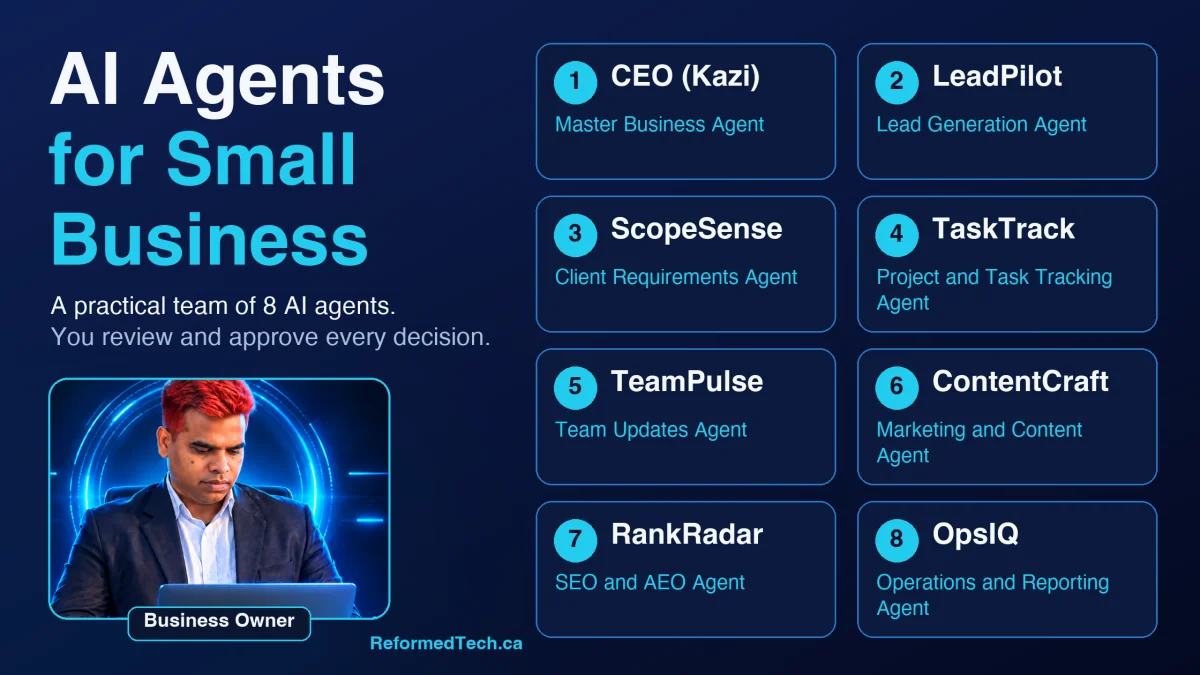
That is why I built a team of AI agents for small business use. Each agent has one job, and each helps me keep daily work organized and moving. In this post, I explain what an AI agent is, how my eight agents work together, and how you can apply the same approach in your own business.
Direct answer: AI agents for small business are software assistants that handle defined, repeatable work, such as tracking tasks, organizing leads, drafting content and preparing reports. They follow instructions you set, work from your business information, and flag what needs attention. The owner stays in charge: people review the output and make every final decision.
What Is an AI Agent for Small Business?
An AI agent is an AI assistant with a clear role, clear instructions and access to specific information. A general chatbot answers whatever you ask. An agent is set up for one kind of work and repeats it the same way each day.
For a business owner, that usually means a few practical things:
- It works from a defined job description, such as "track project deadlines" or "organize new leads."
- It uses the information you give it, like task lists, notes and reports.
- It produces drafts, summaries and alerts that you can act on.
- It hands decisions back to a person.
This is AI agent automation with a human in the loop. The agents prepare and organize. I review and decide. They do not replace my judgment, my team or my final approval on anything that reaches a client.
Why I Built 8 AI Agents
I did not start with eight. I started with the places where work was getting lost: follow-ups that waited too long, project details scattered across messages, and weekly reports I kept putting off.
One large "do everything" assistant was not the answer. It was hard to keep consistent, and I could not tell what it was responsible for. A set of focused agents is easier to manage. Each has a narrow role, so I know what to expect from it and where to look when something needs fixing.
The result is a small digital team that supports daily task tracking, communication and planning. It gives me more room to focus on client work and growth, which is the point of small business productivity tools in the first place.
My 8 AI Agents and What Each One Does
CEO (Kazi) — Master Business Agent
CEO (Kazi) is the coordinator. It pulls together what the other agents report and helps me plan the day.
- Daily tasks it supports: building my daily priority list, flagging conflicts between deadlines and new requests, and summarizing what changed overnight.
- How it helps: I see the whole business in one view. It also supports performance reviews and high-level decisions by laying out the options and trade-offs. The decision stays with me.
LeadPilot — Lead Generation Agent
LeadPilot handles the front of the sales process.
- Daily tasks it supports: researching prospects, organizing lead details, helping qualify inquiries, drafting outreach and reminding me when a follow-up is due.
- How it helps: leads stop sitting in an inbox. The pipeline stays current, and I can see who needs a reply today. I review every message before anything is sent.
ScopeSense — Client Requirements Agent
ScopeSense turns a conversation with a client into a clear project brief.
- Daily tasks it supports: organizing requirements for website and marketing projects, listing clarification questions, and preparing material for proposals.
- How it helps: it reduces the "I thought that was included" problem. When the scope is written down early, the team starts with the same understanding as the client.
TaskTrack — Project and Task Tracking Agent
TaskTrack keeps projects honest.
- Daily tasks it supports: producing the daily task list, updating project status, watching deadlines and alerting me to blocked tasks.
- How it helps: this is the core of daily task tracking AI for me. Instead of asking "where are we on this?" I read a status that is already up to date.
TeamPulse — Team Updates Agent
TeamPulse supports communication across the team.
- Daily tasks it supports: collecting check-ins, summarizing progress, identifying blockers, tracking task handoffs and preparing meeting notes.
- How it helps: meetings start with context instead of catch-up. Blockers surface earlier, and handoffs between people have fewer gaps.
ContentCraft — Marketing and Content Agent
ContentCraft supports our marketing output.
- Daily tasks it supports: drafting blog outlines, social media posts and emails, and repurposing one piece of content into several formats.
- How it helps: it gives me a solid first draft to edit. Everything is reviewed by a person before it is published.
RankRadar — SEO and AEO Agent
RankRadar focuses on search and AI-answer visibility.
- Daily tasks it supports: keyword research, on-page SEO checks, structuring content for answer engines (AEO), recommending FAQ and schema markup, and planning content refreshes.
- How it helps: it keeps SEO work on a schedule. Older pages get flagged for updates, and new content is structured so both search engines and AI tools can understand it.
OpsIQ — Operations and Reporting Agent
OpsIQ looks at how the business is running.
- Daily tasks it supports: preparing weekly reports, tracking performance, documenting workflows, suggesting process improvements and summarizing growth opportunities.
- How it helps: I get a regular, readable picture of the business without building a report by hand. Documented workflows also make it easier to onboard new team members.
How AI Agents Make Daily Tasks Easier
The agents are most useful when they work in sequence. Here is a simple workday for a digital agency like mine.
| Time | Agent | What happens |
|---|---|---|
| Morning | CEO (Kazi) | Builds my priority list from deadlines, new inquiries and open items |
| Morning | TaskTrack | Posts today's task list and flags anything blocked or overdue |
| Mid-morning | LeadPilot | Lists new inquiries, drafts replies for my review, sets follow-up reminders |
| Midday | TeamPulse | Collects team check-ins and summarizes progress and blockers |
| Afternoon | ContentCraft | Drafts social posts or an email for an upcoming campaign |
| Afternoon | RankRadar | Reviews a page for on-page SEO, FAQs and schema, and adds it to the refresh plan |
| Evening | OpsIQ | Records the day's activity and updates the weekly report |
| Evening | CEO (Kazi) | Summarizes what moved, what stalled and what to handle tomorrow |
ScopeSense joins when a new project begins. After a discovery call, it organizes the requirements into a brief so TaskTrack can build the project plan from it.
A realistic example: a website inquiry arrives overnight. LeadPilot logs it and drafts a reply. After I approve the reply and speak with the prospect, ScopeSense organizes what they need. TaskTrack then turns the agreed scope into tasks, and TeamPulse tells the team who owns what. Nobody has to retype the same information.
How AI Agents for Small Business Support Growth
Growth rarely comes from working more hours. It comes from fewer dropped balls and more time spent on the work only you can do. This is where business growth AI agents help.
- Faster, more consistent follow-up. Prospects are less likely to go quiet because nobody replied.
- Clearer projects. Better scoping and task tracking mean fewer surprises for clients and the team.
- Steady marketing. ContentCraft and RankRadar keep content and SEO work moving even in busy weeks.
- Better decisions. OpsIQ summaries show where time and effort are going, so I can choose what to improve next.
- More capacity. Less time on admin leaves more time for client conversations, strategy and quality control.
I do not claim a specific number of hours saved or leads gained. Results depend on your business, your processes and how well the agents are set up. What I can say is that the work is easier to see, and easier to manage.
Best Practices for Using AI Agents
These are the habits that have worked for me.
- Start with one problem. Pick the task that costs you the most attention, such as follow-ups or weekly reports, and build one agent for it.
- Give each agent one clear role. Write down what it does and what it does not do.
- Keep a person in the approval loop. Review anything client-facing, including emails, proposals and published content.
- Use accurate source information. Agents are only as good as the details you give them. Keep prices, services and policies current.
- Protect sensitive data. Do not put confidential client or customer information into tools unless you have checked how it is stored and used. For privacy or legal questions, speak to a qualified professional.
- Review regularly. Check what each agent produces, fix errors and adjust instructions.
- Document your workflows. If the process is not clear to you, it will not be clear to an agent.
Frequently Asked Questions
What are AI agents for small business?
They are AI assistants set up for specific business tasks, such as tracking projects, organizing leads, drafting content or preparing reports. Each works from your instructions and information, and a person reviews the results.
Will AI agents replace my team?
No. Agents handle repeatable preparation and tracking. People still build client relationships, use judgment, deliver the work and approve the final output. In my business, the agents give the team clearer information and fewer manual updates.
How do AI agents help with daily task tracking?
A task-tracking agent compiles the day's tasks, updates project status, watches deadlines and flags blocked work. You read a current summary instead of checking several tools or asking for updates.
Do I need technical skills to use AI workflow automation?
Not always. Simple setups can start with clear written instructions and a consistent process. More connected systems, such as agents that work with your CRM, calendar or website, usually need technical help to set up safely.
Can AI agents help with SEO and AEO?
Yes, in a supporting role. An SEO and AEO agent can help with keyword research, page structure, FAQ content, schema recommendations and refresh planning. It cannot guarantee rankings or AI mentions, and a person should review all recommendations.
Final Thoughts
AI agents for small business work best as a practical team of focused assistants, not a replacement for people. My eight agents help me plan the day, track projects, follow up with leads, keep the team aligned, produce marketing content, support SEO and AEO, and review the numbers. I still make the decisions.
If you are curious, start small. Choose one repeatable task, define the agent's job, and review its output for a few weeks. Build from there.
Work With ReformedTech.ca
ReformedTech.ca is a Calgary digital agency. We help businesses with AI chatbots and AI agents, website design and development, digital marketing, and SEO and AEO. If you want help setting up AI agents or workflow automation, or improving your website and search visibility, talk to us about where your business could use more capacity.
Book a free consultation
Tell us about your daily workload and we will suggest where AI agents, automation or a better website could help. No pressure, no boilerplate proposal.
About the author
Kazi Hasnain is the founder of ReformedTech.ca, a digital agency based in Calgary, Alberta. ReformedTech.ca helps small and medium-sized businesses with website design, SEO, AEO, AI chatbots and AI agents, and lead generation.